






















What is Amazon A+ Content? The Ultimate Beginner's Guide
 Pic Copilot Team
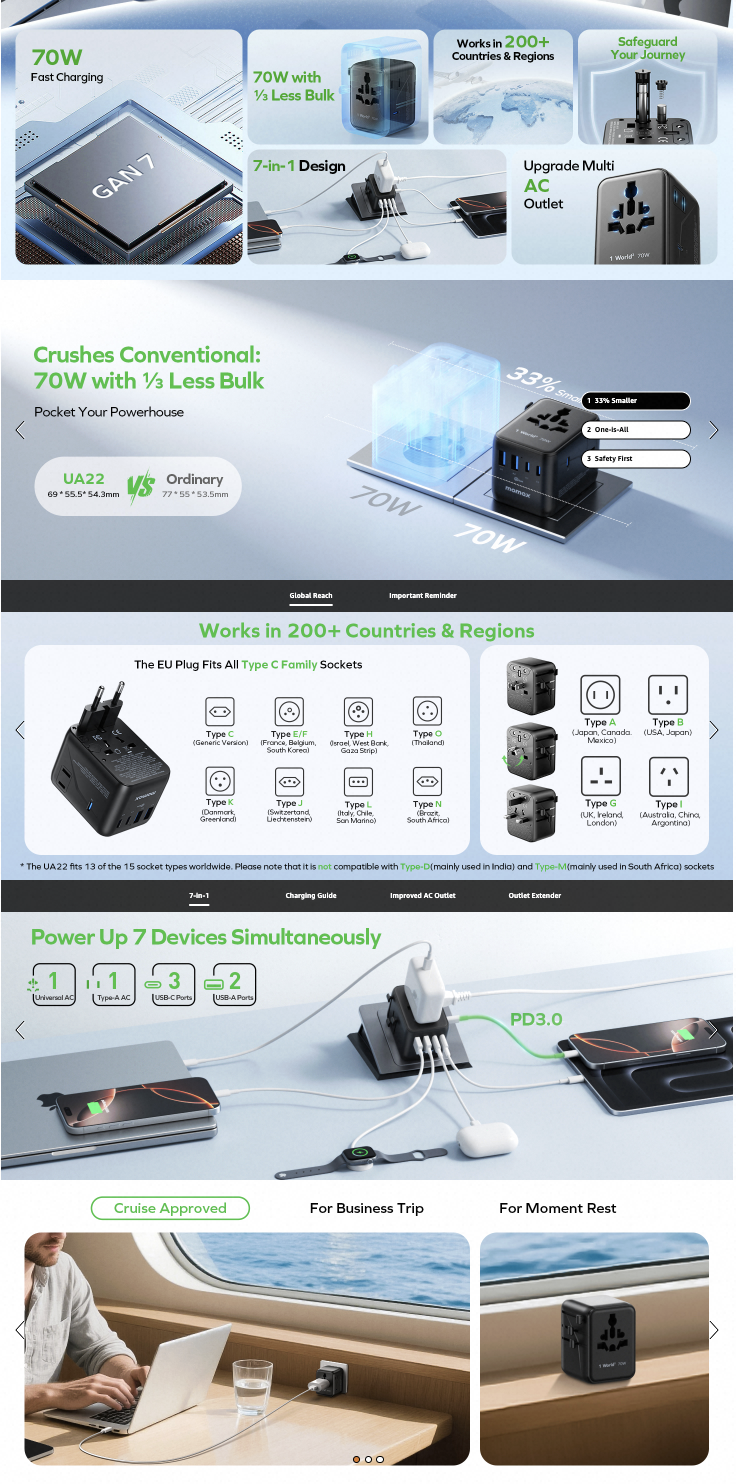
If you have just started selling products on Amazon, you have probably noticed a pattern: some product pages look plain, consisting only of large blocks of boring text. Others, however, look like polished mini-websites, featuring high-definition photos, brand stories, and even comparison charts.
The latter is Amazon A+ Content.
For a beginner, this might sound advanced or even out of reach. But trust me—this is the path you must take to increase your future conversion rates.
What is Amazon's A+ content?
Amazon A+ Content (formerly Enhanced Brand Content) is a feature available to Brand Registered sellers that allows them to modify the text-based product description with rich visuals, enhanced images, and custom layouts to showcase their brand story and product details.
(In simple terms, A+ Content allows you to replace boring text descriptions with rich images and custom layouts.)
Why is everyone talking about it?
This isn't just about aesthetics. According to analysis by growth marketing agency GrowthJockey, A+ content is a key method for brands to build customer trust through Visual Storytelling.
Meanwhile, renowned e-commerce software provider RepricerExpress notes in their industry report that product pages utilizing A+ content typically see significantly higher conversion rates and lower return rates, simply because it helps consumers understand the product better before they buy.
Who is eligible for A+ content?
Many new sellers log into their backend only to find they cannot locate the A+ Content menu.
As emphasized by Amazon service provider SalesDuo in their seller guides, A+ Content is not open to everyone. It has a strict threshold: You must complete Brand Registry.
The specific requirements are:
- Professional Seller Account: You must be on the Professional plan (paying the monthly fee), not an Individual seller.
- Brand Registry: You need to own a valid registered trademark (R mark or a pending trademark in some regions) and complete the registry within Amazon. Without this step, the A+ Content feature will remain locked.
Advice for Beginners:
Although you may just be starting out or testing products, please put "Registering a Trademark" on your schedule immediately. Once you secure your Brand Registry, the door to A+ Content opens for you.
Is Amazon A+ Content Free?
This is the most common question for beginners. The short answer is: Uploading A+ Content to Amazon is free, but creating it can be very expensive.
Amazon does not charge you extra fees for publishing an A+ page. However, designing high-quality images and copy costs money.
- Hidden Costs: If you hire a professional design agency, market rates typically range from $300 to $1,500, depending on complexity.
- The Budget Option: Using AI tools or designing it yourself can compress these costs to almost zero.
If you want a deep dive into specific market quotes and how to avoid overpaying, be sure to read our detailed pricing analysis:
👉 Amazon A+ Content Cost: Is It Free? (Agency vs. AI Pricing 2026)
How to add A+ content to Amazon (Step-by-Step)
Once you have completed your registry, you can start creating. If you need to consult the most authoritative technical parameters and module explanations, you can visit Amazon.com's Seller Central Help documentation for the official manual.
However, official documentation is often long and technical. To save you time, we have boiled the core process down to these 4 steps:
Step 1: Go to Seller Central
Log in to your Amazon Seller Central account.
Step 2: Advertising -> A+ Content Manager
Find the "Advertising" tab in the top menu bar, and click "A+ Content Manager" from the dropdown. Then, click the "Start creating A+ content" button on the top right.
Step 3: Design your content (The Hard Part)
This is where 90% of new sellers get a headache.
At this stage, you need to select different "Modules" (e.g., Hero Image, Image & Text, Comparison Chart). But it isn't as simple as just "uploading a picture." You face several challenges:
- Strict Sizing Requirements: Every module has strict pixel regulations (e.g., 970x600px, 300x300px). Even a single pixel off will cause an error.
- Copywriting & Layout: You need to figure out how to write headlines and body text that are both engaging and SEO-friendly.
- Mobile Optimization: A page designed for a desktop monitor might look like a mess on a smartphone screen, requiring repeated adjustments.
As we mentioned in our Amazon A+ Content Cost article, this step is the main reason many sellers are forced to spend unnecessary money on outsourcing.
Step 4: Upload and Submit
Once the design is complete (if you survive Step 3), you need to apply this A+ page to specific ASINs (products) and click "Submit for approval." Amazon usually completes the review within 7 business days.
A Smarter Way: Don't Wait Until It's Too Late
Step 3 (Design) is the hardest part. Make it the easiest with our AI.
You might be thinking: "I'm still applying for my trademark (or waiting for approval), is it too early to look at this?"
Absolutely not.
Trademark registration usually takes several months. These months are the "Golden Time" for you to pull ahead of your competitors. Smart sellers don't just wait around; they use this time to prepare all their "ammunition."
Why should you experience AI generation right now?
- Confidence in What You See: You can upload your simple product photos right now and let the AI instantly generate a set of pages that look like a top international brand. Seeing your product look this premium will give you massive confidence for your upcoming operations.
- Zero-Cost Trial: You don't need to pay now, and you don't need to hire anyone. You can play around with different styles for free until you find the one that fits your brand perfectly.
- Instant Launch: The day your Brand Registry is approved, while other sellers are still frantically looking for designers or resizing images, you just need to click "Upload" and immediately enjoy the conversion boost from A+ Content.
Don't just launch a product. Launch a Brand.
[Click here to visualize your Premium Brand for FREE with AI]