


 Coba Baju Secara Virtual
 Ganti model AI
 Video Fashion
 Video Produk di Tangan
 Produk di tangan
 Coba Aksesori Secara Virtual
 Latar Belakang Buatan AI
 Salin Gaya
 Hapus Tanda Air
 Templat Cerdas
 Penerjemah Gambar Otomatis
 Coba Sepatu Secara Virtual
 Tokoh Virtual Buatan AI
 Penghapus Latar Belakang
 Bayangan Buatan AI
 Perbesar Resolusi Gambar
 Peningkat Gambar
How AI Customizes High-Converting Amazon Infographics for Every Category
 Pic Copilot Team
In the world of Amazon selling, there is a fatal misconception: "Any image with some text on it will do."
As a result, countless sellers rush to Google searching for "Amazon infographic template free download." What do they get? Thousands of cookie-cutter boxes and generic arrows. But think about it: can a rugged, industrial template meant for a "power drill" really sell a heart-shaped rubber hairbrush designed for "gentle care"? Can a cold, grid-like sizing chart meant for "storage bins" spark the desire to buy a luxury swimsuit?
Trying to sell every product with the same logic is the root cause of stagnant conversion rates. Today, we will break down two drastically different real-world cases—a Heart-Shaped Detangler Brush (Functional) and a Swimsuit (Emotional)—to show how AI breaks the "template curse" and creates Amazon product infographic designs that actually drive sales.
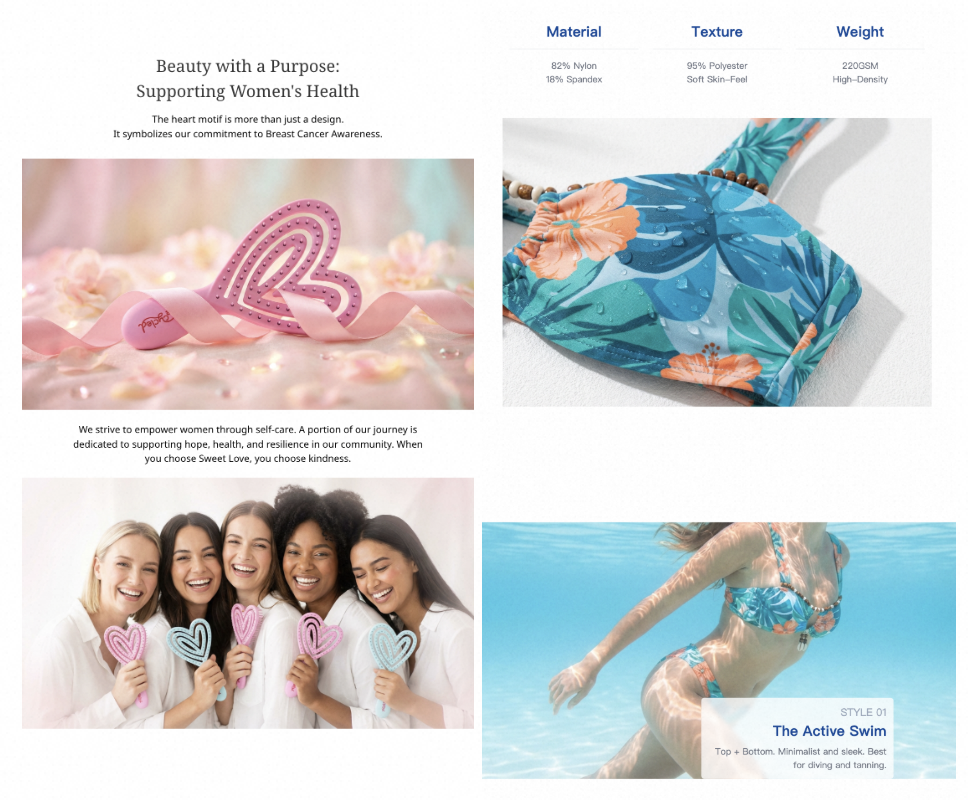
Chapter 1: Why "Dead Templates" are Conversion Killers
Before diving into the cases, we must understand a fundamental psychological law: The human brain processes images 60,000 times faster than text. When a customer scrolls through Amazon on mobile, they spend an average of only 1.2 seconds per image. If you are using generic Amazon infographic examples, you are forcing the user to "read" your image rather than "feel" your product.
1.1 The Cognitive Load Trap
Generic templates are often cluttered with excessive borders, lines, and decorative elements known as "visual noise." On a limited mobile screen, this noise distracts the user. The customer wants to know if the brush bristles are soft; instead, you give them a cool metallic-textured border. This "visual misalignment" leads to immediate bounces.
1.2 The Lack of Emotional Resonance
Amazon is no longer just a search engine; it is an "exploration" platform. Customers don’t just buy products; they buy a "better version of themselves" or a "solution to a problem." Static templates only transmit Data; they fail to transmit the Experience.
Chapter 2: Case Study 1—The Heart-Shaped Brush (Visualizing "Touch" and "Pain Points")
2.1 The Underlying Pain Point: Invisible Comfort
The core selling points of this brush are "Rubber," "Detangler," and "Painless." For functional products like this, consumer doubts are direct:
- "Will this hurt my scalp?"
- "Are the bristles soft enough, or will they pull my hair?"
- "Is this heart shape actually comfortable to hold?"

2.2 The AI Edge: Turning the "Invisible" into "Visible"
If you use a traditional Amazon infographic template, you might draw a circle around the bristles and write "Soft Bristles." That is too pale.
Our AI’s Differentiated Logic:
- Dynamic Pressure Simulation: When our AI identifies "Soft Memory Bristles" in your copy, it doesn't just generate a text box. It creates a "Dynamic Pressure Graphic." By showing the bristles elegantly bending and then snapping back when encountering resistance, it visually tells the user: This brush glides with your hair; it doesn’t pull it.
- Psychological Icon Matching: The AI discards generic checkmarks and automatically matches a "Feather Icon" or "Cloud Icon." Psychologically, these visual associations instantly plant a "weightless, soft, pressure-free" brand imprint in the user’s subconscious.
- Visualizing Grip: The heart shape isn't just for aesthetics. The AI automatically generates a Hand Ergonomics Heatmap, using semi-transparent overlays to show how palm pressure is evenly distributed by the heart structure. This makes the user feel that the brush is "an extension of their hand."
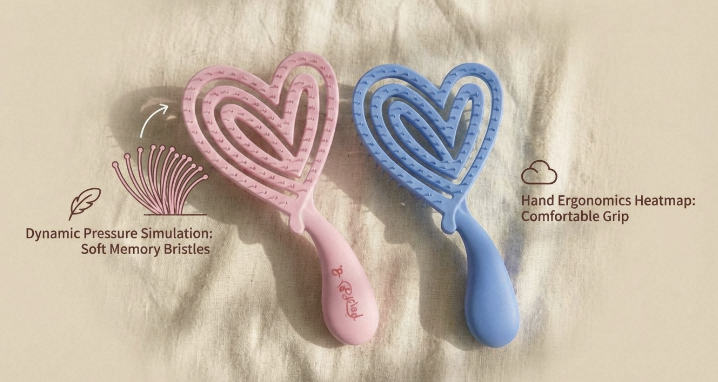
Pro Tip: When creating Amazon listing images for rubber or tactile products, use AI to generate macro close-ups (Macro view) to show texture. This is more convincing than writing "high-quality rubber" a thousand times.
Chapter 3: Case Study 2—The Swimsuit (Creating "Impulse" through Scenery)
3.1 The Underlying Pain Point: Body Anxiety and Scene Disconnect
Swimwear is a non-standard item that relies heavily on visual sensation. The user asks:
- "Will I look good in this at the beach?"
- "Will it hide my midsection?"
- "Is the sizing accurate?"
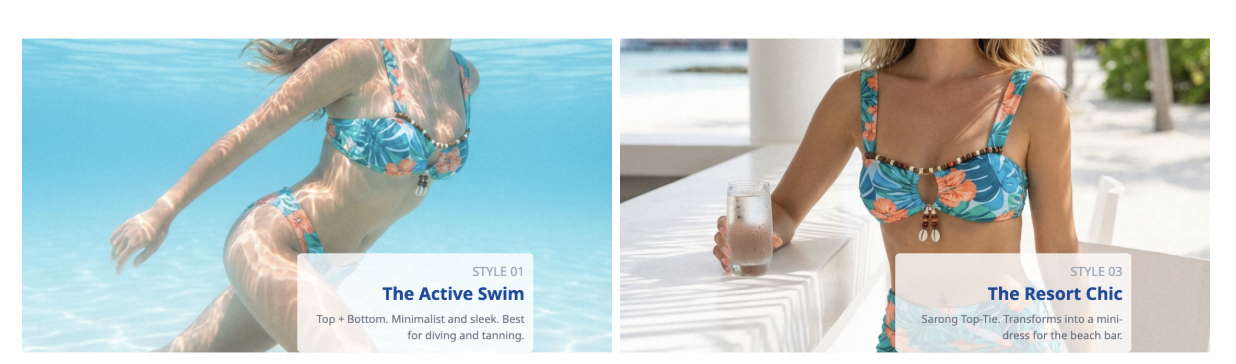
3.2 The AI Edge: Atmosphere Synthesis & Visual Sizing
Many sellers use white-background studio shots for swimwear, which have zero competitiveness among Amazon infographic examples.
Our AI’s Differentiated Logic:
- Instant Scene Transition: In the past, you needed models and plane tickets for Amazon lifestyle images. Now, you only need one flat-lay photo. Our AI identifies your style (Retro, Sporty, Sweet) and merges the product into a Santorini infinity pool or a sunset in Hawaii. The AI handles the lighting integration, making the sunlight reflect naturally off the fabric.
- Eliminating Sizing Fear: Traditional sizing charts are a disaster for returns. Our AI reads your data and generates a Body Contour Chart. Instead of a dry "Bust: 90cm," it labels the measurement points on a chic silhouette and visually predicts the fit for different body types (Apple, Pear, Hourglass).
- Fabric Tech Visualization: Features like "Quick-dry" are hard to show. The AI generates "Water Repellency" macro effects, showing water droplets beads rolling off the surface. This dynamic visual feel is something a "dead template" can never achieve.
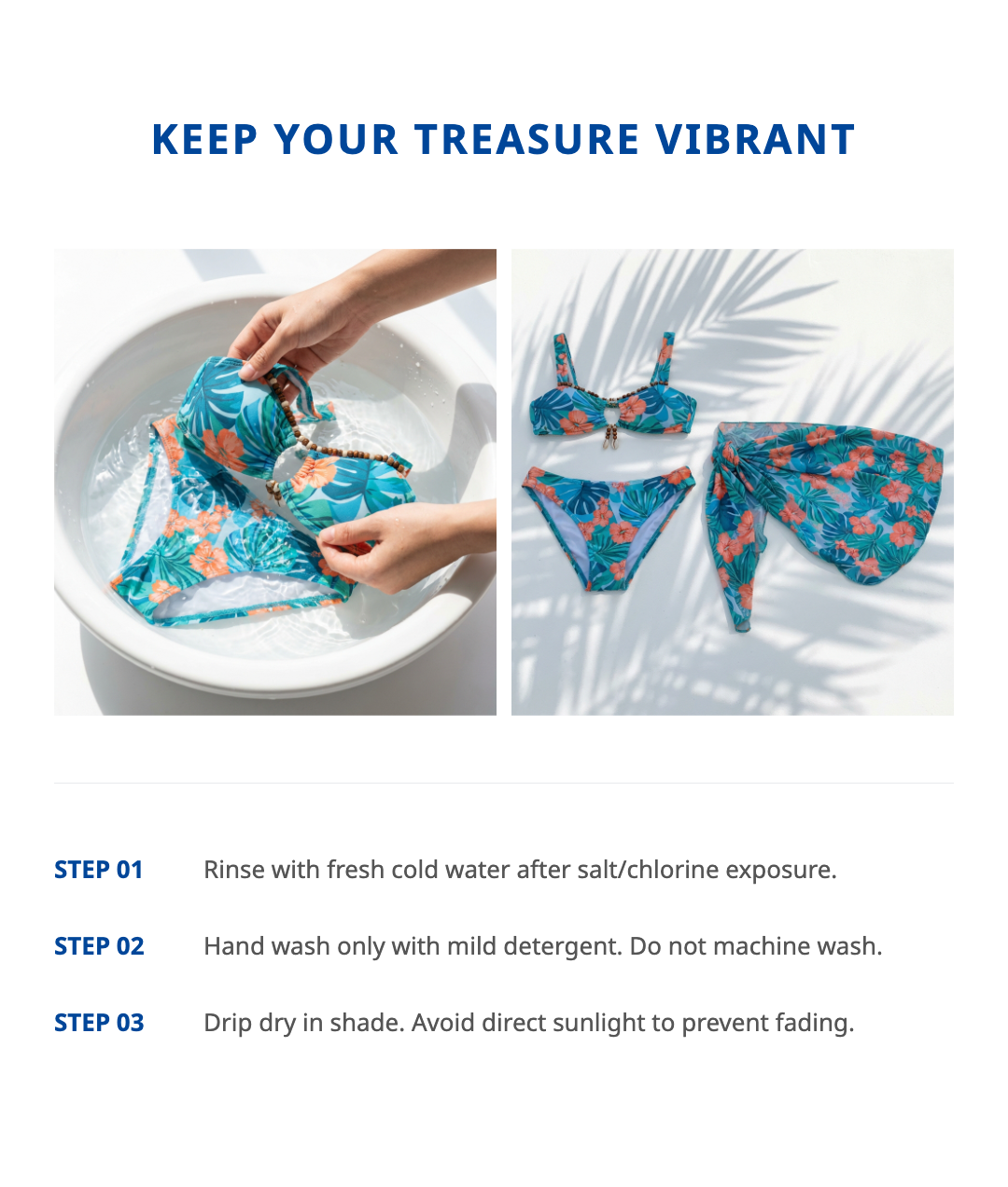
Chapter 4: Technical Core—2026 Compliance and Mobile-First Rules
No matter how good your creative is, if it doesn't meet Amazon infographic guidelines, it’s a zero. More importantly, you must design for the Mobile-First reality.
4.1 Auto-Adapting Amazon Infographic Image Size
Many sellers design on desktops where text looks large, but on mobile, it becomes a "vision test." Our AI tool has built-in hard rules:
- Font Size Warnings: If the AI detects that a core keyword (like "Painless") occupies less than the safety threshold on a 1080x1080 canvas, it automatically adjusts the layout to bold and enlarge the font.
- UI Safety Zone Avoidance: The Amazon app overlays labels (like "Best Seller" or "Prime") at the bottom of images. Our AI identifies these UI overlap zones to ensure your text isn't covered by system badges.
4.2 Semantic SEO Embedding
Modern AI tools don't just "make pictures"; they optimize SEO. When generating an infographic, the AI automatically converts selling points into Alt-text. When Google crawlers scan your page, these AI-optimized keywords boost your external traffic.
Chapter 5: How to Build Your "AI Design Workflow"
If you find design intimidating, the Piccopilot AI logic is incredibly simple:
- Feed the Foundation: Even a mediocre smartphone photo of your brush or swimsuit will work.
- Semantic Understanding: Tell the AI your attributes (e.g., Rubber, Heart-shaped, Detangling).
- Interactive "Chat Photo Editor": Think the background is too flashy? Just say: "Change the beach to a luxury bathroom" or "Make the brush color more pastel pink."
- One-Click Export: The AI generates a full set of 7 images perfectly sized for Amazon.
Conclusion: Tools Should Liberate Productivity
In 2026, the decline in searches for "Amazon template free download" represents the awakening of the seller community. Real competitiveness doesn't lie in how many templates you own, but in how well you understand your product and how fast you can turn that understanding into visual language.
- For the Hairbrush: Let AI be your "Physics Lab," turning invisible comfort into visible elasticity.
- For the Swimsuit: Let AI be your "Hollywood Studio," turning a plain garment into a dream vacation.
Stop struggling with layouts. Stop staring at a blank canvas.
[Try the AI-Driven Amazon Infographic Builder Now]Input your SKU, upload your cover, and let us help you turn traffic into real orders.